P2ware logo
  • Home
  • About
  • Training
  • Partners
  • Contact
Explore P2ware Project Management Tools Screenshots
  • Products
    • P2ware Planner Standard 2011
    • P2ware Planner Professional 2011
    • P2ware Planner Premium 2011
    • P2ware Planner Viewer 2011
    • Project Management Systems
    • Features
    • Previous Versions
  • Solutions
    • Enterprise Project Management
    • Project Management System
    • For Workgroups
    • For Single Users
  • Resources
    • Download
    • Video Presentations
    • Screenshots
    • Products Tour
  • Purchase
    • Price List
    • Licensing
    • Buy On-line
  • Resources
  • Download
  • Video Presentations
  • Screenshots
  • Products Tour
Home Resources P2ware Planner Screenshots

P2ware Planner Screenshots

P2ware Planner Suite

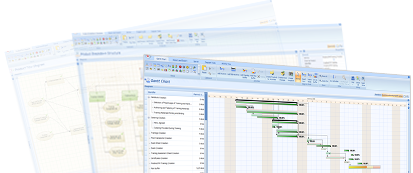
This page presents selected screenshots of P2ware Planner for desktop computers and Planner Server. They present the most important functionalities: planning, execution, reporting, registers, logs, plan publication on Planner Server and other important areas of project management.

P2ware Planner Suite desktop applications

Product Breakdown Structure

Hierarchical structure of products grouped into logical way facilitates defining a project and scope management. Useful also in programme and portfolio management.

Product Flow Diagram

Logical order of delivery or creation of products from which an order of activities is derived. According to the Product Flow Diagram, P2ware Planner automatically generates Activity Network and Gantt Chart.

Product description editor

It is used to describe particular project of products with possibility of editing several objects at a time. With P2ware Planner Premium or P2ware Planner for PSO one can customise and adjust a layout and contents of a product description editor and save it as a new perspective of the editor. These perspectives are available also to users of other versions of P2ware Planner.

Products
Products

This is a view presenting a list of plan products as a table or in a tree form reflecting a product breakdown structure. Presented products can be filtered, grouped and described in a window of properties in the Planner right working area.

Network Diagram (Activity Network)

Graphical presentation of a logical sequence of activities and relations between them with a visible date and times of start and finish. Network Diagram also presents clearly a critical path - activities that determine the earliest completion date of the plan.

Gantt Chart - plan and tracking progress

Gantt Chart presents planned activities in a timeline and allows to track progress. On this chart, project managers may add plan buffers and feeding buffers to protect the critical chain and to observe consumption of these buffers depending on progress of planned and buffered activities.

Resources with assigned activities

View presenting resources assigned to activities in a plan with their descriptions (in the right working area) and activities to which resources are assigned (in the lower working area).

Quality register
Quality register

Quality register is designed for planning quality reviews of products and storing their results. One can assign a quality review to a person or people responsible for it. A single product can have multiple quality reviews.

Risk register
Risk register

Risk register is used to keep information about all relevant threats and opportunities related to plant and its execution. A properly selected set of properties allows to store risk probability, its impact on plan/project, proximity, describe the risk and proposed reaction and also set a person responsible for the risk. One of the important features facilitating project management with P2ware Planner is a possibility of linking entries in the risk register with other plan objects, e.g. products, activities or resources. Thanks to that while working with other plan objects one can simultaneously browse risks related to them.

Lessons log (Lessons learned log)

Lessons learned are important elements of improvement of processes and project management of every organisation. The planner allows to capture all lessons learned without using other tools or files. In an environment with Planner Server, it is possible to group and analyse lessons learned from multiple projects, programmes or portfolios. Lessons learned can come from various projects.

Buffer chart (buffer consumption chart)

Chart presenting actual buffer consumption and actual state of the plan execution. When buffer is in the yellow area it means that delaying a project is quite probable and entering into the red zone means that corrective actions are to be immediately taken.

Reports
Reports

The software comes with a set of predefined built-in reports to be used when working on a plan or during its execution. Planner Professional, Premium, Enterprise and For PSO allow to create own or modify existing report templates.

Cost chart
Cost chart

Chart of planned costs and its changes during plan execution facilitates cost control of the whole project/plan as well as the costs of a particular activity or resource.

Connection to documents library

Możliwość podłączenia do planu wielu dokumentów, które znajdują się w folderze na dysku, zasobie sieciowym czy bibliotece SharePoint.

Calendars
Calendars

Defining a base calendar for a plan, activity or specific resources. One can define dates ranges, work week templates and exceptions.

Schedule
Schedule

Activities can be presented also in a form of a calendar, i.e. activities executed on particular days, weeks and months. It can be easily understood not only by project managers but also by every team member.

Work package and its activities

Activities are sent for execution in a form of work packages. This view presents already defined work packages which may be edited but also one can define new work packages and include other plan objects such as activities, products, checkpoints. Defined and described work packages can be sent to people responsible for it and its progress can be easily tracked with checkpoint reports.

Checkpoints
Checkpoints

Checkpoints determine dates when people who are responsible for it are to submit progress reports about specific work package to a project manager. On this view, one can edit checkpoint reports and, if needed, import data from timesheets of relevant resources.

Checkpoints and checkpoint report editor

Checkpoint reports are used to track progress of assigned resources, activities and products executed by people responsible for it. Data reported includes percent completed, costs and current and estimated work. During the usage of Planner Server and timesheets, it is possible to import reported data from resources timesheets.

Activities snapshots

Activity snapshots are saved states of activity data at a time of creating a snapshot. Snapshots are useful tools for tracking and analysing project progress, cost control and changes in buffer consumption.

Import and export
Import and export

Planner has advanced import and export options which enable users to exchange plan data with other popular software packages. It also allows to import and export Planner's plan settings such as perspectives and layouts. Thanks to that, perspectives created by a project manager they may be easily used by others.

Daily log
Daily log

Daily log is used to keep information related to plan creation and its execution. In small projects it can be also used to store risks and project issues (and later transfer to relevant registers). With Planner Premium or For PSO it is possible to configure properties that describe log entries and adjust them to specific requirements of industry, project or organisation.

Context help
Context help

In each view in P2ware Planner and most of available windows, there is a contextual help available describing a current view or a window. By opening a help file (blue icon with question mark) user has also access to other help topics with browsable and searchable index.

User interface customization

Planner has special customisation features that allows for customisation of plan adjusted to actual requirements of projects and organisations. User interface customisation is a view that enables advanced users to hide unneeded views, properties, perspectives and related objects. Plan templates created this way may be distributed to other project managers and also used by project support offices to enforce project management standards.

User custom properties

In P2ware Planner all plan objects (e.g. risk, product) have a set of built-in properties. With Planner Premium and For PSO users can add own properties of various data types including custom formulas computed based on other properties or formulas. New properties and formulas are often added during the creation of plan templates adjusted to organisation requirements.

Report sent via e-mail

Reports generated in P2ware Planner may be sent to interested people as attachments in all popular file types.

Report designer
Report designer

Planner comes with a set of predefined built-in reports (with an exception of the Standard version) which allows report template customisation and creating own templates.

Plan publication on server

In integrated project management systems with Planner Server, plans created with Planner Enterprise or For PSO can be published on Planner Server for distribution or further edition by multiple users. To browse plans on Planner Server users may use standard internet browser.

Plan synchronization

In system based on P2ware Planner Server changes in a local plan can be synchronised with the plan published on Planner Server.

Adding a product from other plan

In project management systems with Planner Server, plans can be linked with other projects plans and products and activities that are important for products or activities covered by the current plan. When synchronising plan owners with products/activities from other plans, they are informed about changes and may take any necessary actions.

P2ware Planner Server

Activity sheet in Planner Server

Activity sheet in Planner Server presents all activity data that are available in desktop computers but in a different form. People with proper access rights may browse and modify plan data using their web browser (even without installing any version of desktop Planner).

Sending work packages with Planner Server

Plan is executed by sending work packages to people responsible for their execution. In a system with Planner Server, work packages can be sent out using the server and internet browser.

Planner Server - sample report

Planner Server allows to browse single plans as well as various project plans grouped in programmes and portfolios. It also allows to create reports with data from a single project and cross-sectional reports customised and adjusted to specific needs of various management functions and levels.

Risk register (and other registers) in Planner Server

Planner Server allows people with suitable access right to browse and modify risks, issues and quality reviews. Resources can enter and describe risks and issues relevant to their projects. Added risks and issues can be later synchronised by a project manager.

Access control editor in Planner Server

Project management system with P2ware Planner Server can store a lot of data from various projects. Since not all users should have access to all the data, P2ware Planner includes advanced list editor of access control. The editor allows for creating custom rules allowing users to perform specific actions on particular plans or their parts.

  • Home
  • About
  • Training
  • Partners
  • Contact
  • Privacy Policy
  • Copyrights & Trademarks
  • Products
  • P2ware Planner Standard 2011
  • P2ware Planner Professional 2011
  • P2ware Planner Premium 2011
  • P2ware Planner Viewer 2011
  • Project Management Systems
  • Features
  • Previous Versions
  • Solutions
  • Enterprise Project Management
  • Project Management System
  • For Workgroups
  • For Single Users
  • Resources
  • Download
  • Video Presentations
  • Screenshots
  • Products Tour
  • Purchase
  • Price List
  • Licensing
  • Buy On-line
Copyright © 2004-2012 P2ware Sp. z o. o.
  • Privacy Policy
  • Copyrights & Trademarks
  • Contact